



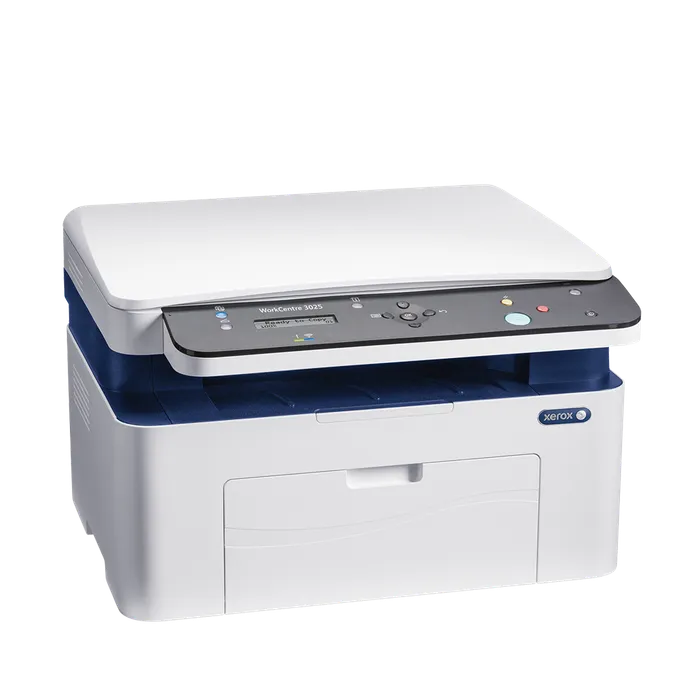
The Xerox 3025B Monochrome Laser Multifunction Printer brings printing, copying and scanning together in a compact desktop device. Designed for home offices, small businesses and individual workstations, it helps keep everyday document tasks close at hand. From preparing invoices to digitising signed forms, this multifunction printer supports a practical office workflow. Its combination of wireless connectivity, straightforward controls and monochrome laser output makes it a useful option for workplaces focused on routine paperwork.
For businesses that mainly produce text documents, black-and-white printing provides a clear, consistent presentation. Letters, purchase orders, delivery notes, quotations and internal reports can all be handled through the same machine. The printer is particularly relevant when colour output is unnecessary and the priority is readable business information. Whether used by an accounts department, a small retail office or a professional working from home, it supports familiar document requirements throughout the working day.
Print speeds reach 20 pages per minute on A4 and 21 pages per minute on Letter paper. These figures help users understand the difference between regional paper formats when comparing specifications. Actual speed depends on the document, print settings and operating conditions. Xerox specifies 600 × 600 dpi native print resolution, with up to 1200 × 1200 enhanced image quality. This distinction provides a more accurate description than presenting the enhanced figure as native resolution. Additional details appear in the official Xerox WorkCentre 3025 brochure.
Built-in Wi-Fi connectivity gives users flexibility when positioning the printer within a suitable wireless network. A compatible computer can send documents wirelessly, helping reduce the need to keep the printer immediately beside a workstation. This is convenient for shared desks and compact offices where equipment placement matters. The platform also supports Wi-Fi Direct, allowing compatible devices to establish a direct wireless connection after configuration. Wireless printing availability depends on the device, software and connection settings used.
For a direct connection, the Xerox WorkCentre 3025B also offers High-Speed USB 2.0. USB can be useful when a single computer handles most printing and scanning tasks. It provides an alternative connection method for a dedicated office workstation or home office desk. Users should install the appropriate printer and scanner software for their operating system. The Xerox WorkCentre 3025 drivers and downloads page provides official software packages and platform selection options.
The flatbed scanner provides a straightforward way to digitise individual originals. Place a document on the glass, align it correctly and select the required scanning settings through the available software or device controls. This approach suits invoices, application forms, certificates and other paperwork that benefits from careful placement. For the Wi-Fi flatbed configuration documented as WorkCentre 3025BI, originals are positioned individually because this version does not include an automatic document feeder.
Although the machine prints in monochrome, its scanner supports colour, greyscale and black-and-white scanning. This distinction is useful when retaining the appearance of coloured stamps, signatures or document highlights in a digital record. Available scanning workflows include common formats such as PDF, JPEG and TIFF, depending on the selected software and settings. Scanned files can then be organised into folders, attached to emails from a computer or retained alongside other business records.
Copying functionality adds convenience when an extra paper version is needed quickly. Users can reproduce a form, retain a copy of a signed document or prepare additional reference sheets using the flatbed. The WorkCentre 3025 platform includes useful copy settings, including reduction and enlargement, with availability governed by the configuration. ID card copying is another practical feature for arranging both sides of a small original on one sheet. Follow the Xerox WorkCentre 3025 user guide for operating instructions.
Paper handling is suitable for everyday desktop printing. The standard input tray holds up to 150 sheets, while the output tray accommodates up to 100 sheets, using the specified standard paper. Supported printing sizes include familiar formats such as A4, A5, Letter and Legal, subject to media requirements. Selecting the correct paper size and type in the driver helps match the document to the loaded stock and supports more consistent results across routine office jobs.
The printer uses manual two-sided printing, requiring users to turn and reload sheets when printing the reverse side. This can help reduce paper use for drafts, internal notes and reference documents. The exact procedure depends on the application and driver, so checking the paper orientation before a larger job is useful. A short trial with a few pages helps establish the correct loading direction and page order before producing a complete document.
Its compact desktop design makes the Xerox WorkCentre 3025B easy to incorporate into an organised workspace. Combining three document functions in one unit reduces the number of separate devices required for basic office tasks. Positioning it on a stable surface with suitable access to the paper tray and scanner keeps daily operation convenient. Leaving the recommended ventilation and access space also supports proper installation and makes routine cleaning or cartridge replacement easier.
The printer uses a single all-in-one toner cartridge, helping simplify supplies management. For a small office, keeping a suitable replacement available can make routine maintenance easier to plan. Follow the manufacturer’s handling instructions when changing the cartridge and use supplies specified for your exact model and region. Regularly cleaning the scanner glass helps prevent marks on digital files and copies. Keeping paper dry, aligning the tray guides and avoiding damaged sheets also supports dependable document handling. These straightforward habits help maintain a more consistent workflow, particularly when several people use the machine for invoices, customer forms, correspondence and other daily administrative tasks.
For product enquiries, quotations and help choosing an appropriate office printer, contact Aadinath Peripherals & Consumables. Customers can also explore the wider printer collection when comparing document handling, connectivity and business requirements. The Xerox WorkCentre 3025B offers a practical combination of monochrome laser printing, flatbed copying, colour scanning, Wi-Fi and USB connectivity for everyday office documentation. Matching these features to your typical documents and workflow helps you choose equipment suited to your working environment, expected workload and connectivity requirements.

Product Specifications
| Specification | Details |
|---|---|
| Brand | Xerox |
| Model | WorkCentre 3025B |
| Product Type | Monochrome Laser Multifunction Printer |
| Functions | Print, Copy, Scan |
| Printing Technology | Laser |
| Printer Output | Monochrome |
| Print Speed | Up to 21 ppm |
| Print Resolution | Up to 1200 × 1200 dpi |
| Scanner Type | Flatbed |
| Document Feeder | Automatic Document Feeder |
| Connectivity | USB, Wi-Fi |
| Wireless Printing | Yes |
| Duplex Printing | Manual |
| Recommended Usage | Home Office / Small Business |
| Printer Type | Multifunction |
| Colour Printing | No |
Reviews
Clear filtersThere are no reviews yet.