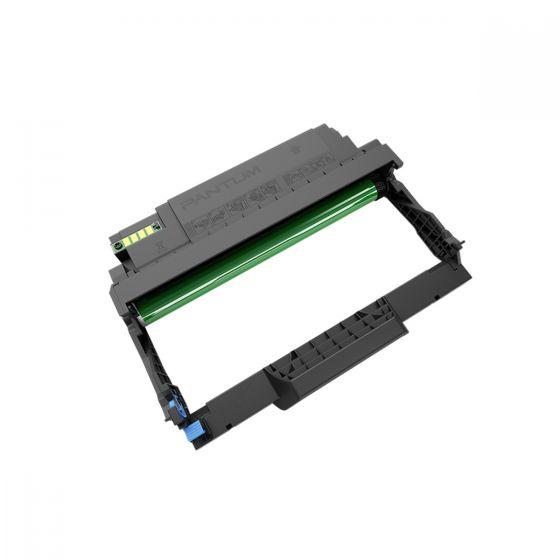
Printmark P2031Z0 Imaging Drum Unit
The Printmark P2031Z0 Imaging Drum Unit is a replacement drum and imaging component for compatible Printmark monochrome laser printers. Printmark lists a rated imaging unit capacity of 12,000 pages and identifies the P2031Z0 among the consumables for the PMS2031DW and PMX2031ADW. Its specific part number and clearly stated rated capacity help buyers select the correct replacement imaging supply for routine office printing, scheduled maintenance and consumable replenishment.
Imaging Drum for Monochrome Laser Printing
The imaging drum participates in forming the printed image during the laser printing process. It works alongside the toner supply within the supported printer’s imaging system, helping produce the text and graphics used in everyday documents.
For offices printing letters, invoices, reports, forms and reference material, maintaining the imaging components is part of regular printer care. The finished output also depends on the toner cartridge, paper, print settings and overall condition of the device. Follow the printer’s maintenance guidance when assessing print quality or arranging replacement parts.
Compatible Printmark Printer Models
Printmark lists the P2031Z0 drum for the Printmark PMS2031DW and Printmark PMX2031ADW. These devices cover single-function and multifunction monochrome printing requirements within the manufacturer’s PMS and PMX 2 Series.
The PMS2031DW serves dedicated document printing, while the PMX2031ADW combines printing with copying and scanning. When ordering, check the complete printer model and P2031Z0 reference against the existing imaging unit or device documentation. Recording both identifiers makes purchase requests clearer, especially where several printers share an office or supplies store.
Rated Imaging Unit Life of 12,000 Pages
Printmark specifies a 12,000-page imaging unit capacity for this supported printer platform. The rating provides a useful reference when planning drum purchases and maintaining records for office consumables.
Actual service life depends on usage and printing conditions. Treat the rated figure as a maintenance planning reference alongside the printer’s supply information and replacement guidance. It describes the imaging unit’s rated life; toner consumption is tracked separately. Keeping installation dates and usage records can help teams understand when the drum may next require attention.
Separate Drum and Toner Components
The supported printers use separate drum and toner technology. The P2031Z0 is the imaging drum component, while Printmark lists toner options such as P2031L0 and P2031H0 for the same printer family.
Each component performs a different role within the printing system. Toner supplies the material used to create the printed marks, while the drum supports image formation. Check the device’s message and relevant maintenance instructions before choosing a replacement. This helps purchasing staff order the component required by the printer and keeps stock records specific.
Planning Printer Maintenance and Replacement Stock
Office printing requirements often increase around invoicing dates, examinations, meetings or scheduled reporting. Reviewing supply information before these periods helps teams organise maintenance around their document workload.
Maintain a simple record showing the printer model, installed drum code, installation date and spare quantity available. For a shared office device, assign a clear contact for consumable requests so that replacement stock can be located quickly. Include the P2031Z0 part number on quotations and purchase orders to keep repeat orders consistent.
Installation and Storage Guidance
Replace the imaging drum according to the instructions supplied with the compatible Printmark printer. Follow the specified handling procedure, fit the unit correctly and complete any replacement steps described in the device’s guide.
After installation, print a sample document to check the output before starting an important batch. Keep unused replacement units in their packaging until required and follow the storage information supplied with the product. Retain the packaging label or purchase record so the exact drum reference remains available for future maintenance.
Keep a reference copy of a typical office document for checking the printer after maintenance. Comparing the same file with the same settings makes changes easier to assess. If output remains uneven, consult the printer’s troubleshooting instructions and support team so that further action follows the diagnosed cause. Store the reference print with the printer’s maintenance record for future comparison.
Buy Printmark P2031Z0 Imaging Drum Unit
Choose the Printmark P2031Z0 through Aadinath Peripherals and Consumables for your compatible printer’s imaging unit requirement. Contact the team for current pricing, availability and assistance checking the correct replacement component. Share the printer model, P2031Z0 part number and required quantity when requesting a quotation.
Specifications
| Specification |
Details |
| Brand |
Printmark |
| Model / Part Number |
P2031Z0 |
| Product Type |
Imaging drum unit |
| Printing Technology |
Monochrome laser |
| Rated Imaging Unit Capacity |
12,000 pages |
| Compatible Models |
Printmark PMS2031DW and PMX2031ADW |
| Printer Family |
Printmark PMS / PMX 2 Series |
| Consumable System |
Separate drum and toner components |
| Component Function |
Imaging drum component for the supported printer |
| Typical Applications |
Letters, invoices, reports, forms and office documents |
| Service Life Conditions |
Actual service life varies with usage and printing conditions |






Reviews
Clear filtersThere are no reviews yet.