



Epson EcoTank L8180 – Stunning A3+ Multifunction Photo Printer
The Epson EcoTank L8180 A3+ Multifunction Ink Tank Photo Printer is a premium six-colour photographic printer designed for professional photographers, creative studios, graphic designers, artists and customers who require beautiful large-format prints.
Featuring Epson Claria ET Premium Ink, Micro Piezo Heat-Free Technology, high-resolution printing and a versatile paper-handling system, the Epson EcoTank L8180 delivers detailed photographs, smooth colour transitions and professional-looking documents.
The printer combines printing, colour scanning and photocopying in one machine. Its integrated six-colour refillable ink tanks, 4.3-inch colour touchscreen, wireless connectivity and direct photo-printing features make it suitable for both creative and everyday printing applications.
With borderless printing up to A3+, automatic A4 duplex printing and compatibility with selected thick artistic media, the Epson EcoTank L8180 provides a powerful solution for professional photography and creative printing.
Professional A3+ Photo Printing with Epson EcoTank L8180
The Epson EcoTank L8180 is designed to deliver high-quality photographic output on paper sizes up to A3+.
A3+ printing provides a larger canvas than conventional A4 photo printers, making it especially useful for portraits, landscapes, wedding photographs, artworks and graphic presentations.
The printer supports borderless A3+ printing on compatible media, allowing photographs to extend to the edges of the paper.
This helps produce attractive prints suitable for framing, portfolios and decorative displays.
Photographers can print large family portraits, professional images and artistic compositions without relying on a separate larger-format photo printer.
For creative professionals requiring detailed colour printing, the Epson EcoTank L8180 combines large-format capability with a refillable ink system.
Six-Colour Epson Claria ET Premium Ink Technology
One of the most important advantages of the Epson EcoTank L8180 is its six-colour Epson Claria ET Premium ink system.
The printer uses Pigment Black, Photo Black, Cyan, Magenta, Yellow and Grey inks.
Unlike the conventional six-colour photo systems that use Light Cyan and Light Magenta, the L8180 features a dedicated Grey ink and separate black inks for different printing requirements.
This configuration is designed to provide rich photographic colours, smooth tonal gradations and clear black-and-white photographs.
The dedicated pigment black ink helps produce sharp text on compatible plain paper.
The dye-based Photo Black, Cyan, Magenta, Yellow and Grey inks are intended for high-quality photographic printing.
This combination makes the Epson L8180 versatile for both professional photo prints and everyday office documents.
Beautiful Black-and-White Photographs with Grey Ink
The Epson EcoTank L8180 includes a dedicated Grey ink tank that helps improve black-and-white photographic reproduction.
Black-and-white photographs often contain subtle variations between dark shadows, midtones and highlights.
The Grey ink helps produce smoother transitions across these tonal areas.
This makes the printer particularly appealing for portrait photographers, fine art photographers and customers who regularly create monochrome photographic prints.
The six-colour ink system is also suitable for colour photographs containing delicate gradients and detailed lighting effects.
For creative professionals who value both colour and monochrome photographic quality, the L8180 provides a distinctive ink configuration.
Pigment Black Ink for Sharp Text Documents
The Epson EcoTank L8180 includes a dedicated pigment black ink reservoir.
Pigment black ink is designed to produce sharp, clear text on compatible plain paper.
This makes the printer suitable for printing business letters, invoices, project notes, reports and other documents alongside photographs.
The pigment formulation helps maintain text definition and readability.
The separate dye Photo Black ink supports photographic printing requirements.
This combination allows the printer to serve users who need both beautiful photo prints and convenient everyday document printing.
The two black inks are not interchangeable and must be refilled using their corresponding genuine Epson bottles.
High-Resolution 5760 × 1440 dpi Printing
The Epson EcoTank L8180 features a maximum printing resolution of 5760 × 1440 dpi with Variable-Sized Droplet Technology.
This supports the reproduction of fine photographic details, smooth gradients and sharp text.
High print resolution is particularly useful when working with detailed landscapes, portraits, creative designs and colour graphics.
The printer uses Epson Micro Piezo printing technology to help control ink placement accurately.
Its minimum ink droplet size is approximately 1.5 picolitres according to Epson’s India technical brochure.
Print quality depends on the source image, colour-management settings, paper type and selected print mode.
For best photographic results, users should select suitable photo paper and an appropriate quality setting.
Fast Printing for Photos and Documents
The Epson EcoTank L8180 offers useful printing speeds for both documents and photographs.
Under Epson’s draft printing conditions, the printer can deliver up to 32 pages per minute in black and colour on A4 plain paper.
Under ISO 24734 testing, the printer achieves approximately 16 images per minute for black A4 documents and 12 images per minute for colour A4 documents.
These figures make the printer suitable for printing documents and design previews alongside professional photographs.
Photo-printing speeds depend on the selected photo size, media and quality settings.
Epson’s international technical specifications list approximately 25 seconds for a 10 × 15 cm photograph under the stated test method.
Actual print times may vary according to the image content, driver settings and paper used.
A3+ Borderless Photo Printing
The Epson EcoTank L8180 supports borderless printing up to A3+ on compatible photographic media.
Borderless printing eliminates ordinary white margins, allowing images to fill the paper surface.
This makes it useful for professional portraits, fine art photographs, portfolio prints, landscape photography and creative displays.
The printer also supports popular smaller formats such as 4 × 6 inches, 5 × 7 inches, 8 × 10 inches and A4.
Borderless capability depends on the selected paper size, media type and printer settings.
For photo studios, this flexibility enables multiple photographic print formats using one machine.
Automatic A4 Duplex Printing
The Epson EcoTank L8180 includes a built-in automatic duplex printing function.
Automatic duplex printing allows users to print on both sides of compatible A4 plain paper without manually turning each sheet.
This is useful for reports, business correspondence, forms, presentations and other double-sided documents.
Under ISO testing conditions, the printer offers automatic A4 duplex speeds of approximately 6 ipm black and 5 ipm colour.
Automatic duplex printing helps reduce paper consumption and simplifies document preparation.
Automatic duplex printing is supported up to A4, not A3 or A3+.
Customers who require automatic double-sided A3 printing should choose a different model with verified A3 duplex capability.
High-Resolution Colour Flatbed Scanning
The Epson EcoTank L8180 includes an integrated colour CIS flatbed scanner.
The scanner provides a hardware resolution of 1200 × 4800 dpi.
This supports detailed scanning of photographs, documents, artwork, forms and other originals.
Epson India’s brochure specifies a maximum scan area of approximately 216 × 355.6 mm, corresponding to Legal size.
The printer can scan originals in colour, grayscale and black-and-white modes.
For photographers, the scanner provides a convenient way to digitise suitable prints.
For home and professional users, it can also be used to scan letters, forms and business records.
Although the printer produces A3+ photographs, its flatbed scanner is not an A3 scanner.
Convenient Standalone Photocopying
The Epson EcoTank L8180 provides standalone copying in black and colour.
Users can reproduce documents directly from the printer without using a connected computer.
The printer supports up to 99 copies in a standalone copying operation.
Its copying system includes reduction and enlargement functions ranging from 25% to 400%.
The manufacturer lists a maximum copy print resolution of 720 × 720 dpi.
Copying is suitable for documents, photographs, business records, letters and creative materials that fit the scanner.
Epson’s brochure specifies a maximum copy size of Legal.
The L8180 does not include an Automatic Document Feeder, so multi-page originals must be placed on the flatbed individually.
Large 4.3-Inch Colour Touchscreen
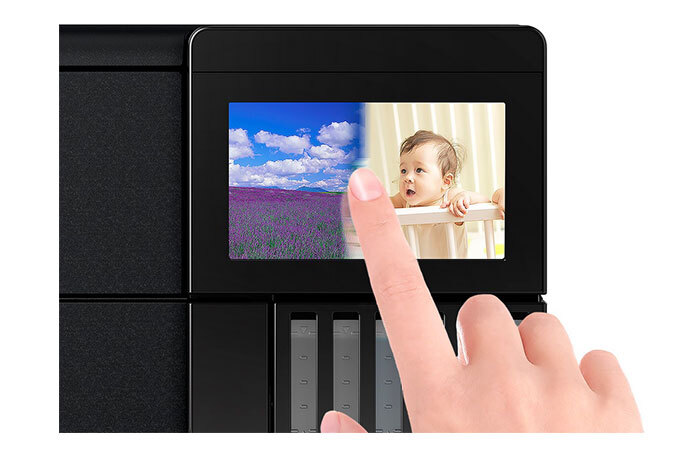
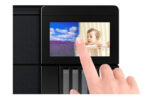
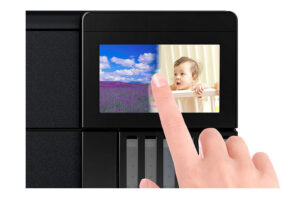
The Epson EcoTank L8180 features a 10.9 cm (4.3-inch) colour touchscreen.
The touchscreen provides convenient access to printing, scanning, copying and maintenance settings.
Users can preview compatible photographs and select printing options directly from the screen.
This is especially useful when printing images from SD cards or USB flash drives.
The larger touchscreen makes standalone operation easier than on models without a display.
For photography studios and shared workspaces, it provides a convenient interface for accessing everyday functions.
Direct Photo Printing from SD Cards
The Epson EcoTank L8180 supports direct photo printing from compatible SD memory cards.
Users can insert a supported memory card and access compatible images through the printer’s touchscreen.
This reduces the need to transfer photographs to a computer before printing.
The feature is particularly convenient for photographers using digital cameras with SD storage.
Epson’s India brochure identifies JPEG as a supported direct-printing file format.
Customers should verify memory-card compatibility and supported image formats when using specialised camera workflows.
USB Flash Drive Photo Printing
In addition to SD cards, the Epson EcoTank L8180 supports direct printing from compatible USB flash drives.
Users can select supported image files through the colour touchscreen.
This provides a convenient way to print photographs without connecting a separate computer.
For photo studios, direct USB printing can simplify occasional printing requests from customers.
The USB host interface also supports compatible storage-device workflows.
Memory-device capacity, formatting and file compatibility should follow Epson’s recommendations.
Wi-Fi Connectivity for Flexible Photo Printing
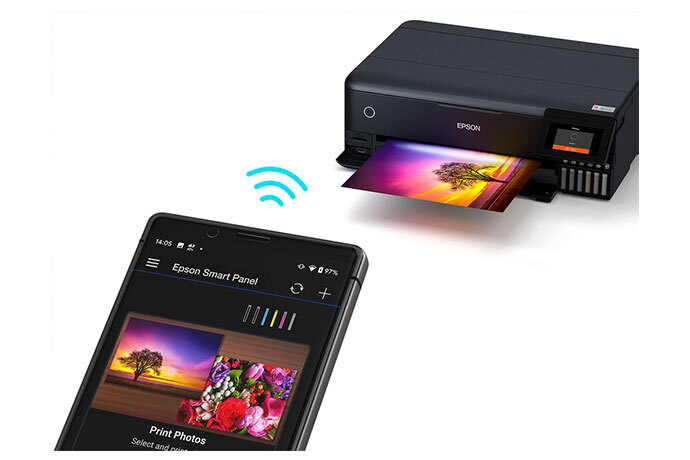
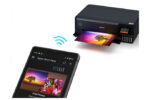
The Epson EcoTank L8180 features built-in Wi-Fi networking.
Users can connect the printer to a compatible wireless network and print from supported computers, laptops, smartphones and tablets.
Wireless connectivity makes it convenient for photography studios where images are processed on different workstations.
It also allows the printer to be positioned in a shared print area without requiring a permanent direct USB connection.
Wireless operation depends on network signal quality and compatible software.
The printer also supports Wi-Fi Direct for additional wireless flexibility.
Wi-Fi Direct for Router-Free Printing
The Epson EcoTank L8180 supports Wi-Fi Direct.
Wi-Fi Direct allows compatible devices to connect directly to the printer without a separate wireless router.
This is useful when printing from a supported smartphone, tablet or laptop in a temporary workspace.
For creative businesses, Wi-Fi Direct provides an alternative to ordinary wireless networking.
Users should configure their devices using Epson’s recommended connection procedure.
The feature does not eliminate the need for compatible printing software and supported device settings.
Ethernet Networking for Photo Studios
The Epson EcoTank L8180 features a built-in Ethernet interface supporting 10BASE-T and 100BASE-TX connections.
This allows the printer to connect to a compatible wired local area network.
Ethernet connectivity can be useful in photography studios and offices that share the printer among several computers.
A wired connection can also suit workspaces where users prefer to avoid wireless network configuration.
The printer’s combination of USB, Ethernet, Wi-Fi and Wi-Fi Direct provides flexible installation options.
Users should install the appropriate Epson drivers and configure permissions as required by their network.
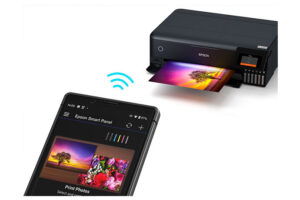
Epson Smart Panel Mobile Application
The Epson EcoTank L8180 supports the Epson Smart Panel application.
This app provides convenient access to compatible printer setup, status monitoring and supported printing functions from smartphones and tablets.
Users can access selected maintenance functions, manage wireless settings and print photographs through supported workflows.
The app can also assist with copying and printer troubleshooting.
For users storing photographs on mobile devices, Epson Smart Panel makes it easier to turn selected images into physical prints.
Available features depend on the phone, operating system, app version and printer configuration.
Apple AirPrint and Epson Connect
The Epson EcoTank L8180 supports Apple AirPrint for compatible devices.
Epson also identifies Epson Connect services, including Epson Email Print, Remote Print Driver and Scan to Cloud, as part of the printer’s supported ecosystem.
These features provide flexible printing and scanning options across compatible devices.
Email Print allows supported documents to be sent to a registered printer through email.
Scan to Cloud supports selected online scanning workflows.
Remote printing and cloud services require a compatible internet connection and the appropriate registration or configuration.
Two Front Paper Cassettes
The Epson EcoTank L8180 includes two front-loading paper cassettes.
The smaller photo cassette accommodates up to 20 sheets of compatible 5 × 7-inch photo paper.
The second front cassette supports up to 100 sheets of suitable A4 plain paper.
This arrangement provides separate sources for everyday documents and smaller photographs.
For photographers and creative professionals, having dedicated photo and document trays reduces the need to change media before every print.
The supported capacity varies depending on the selected paper type and thickness.
Rear A3+ Paper Feeder
The Epson EcoTank L8180 includes an A3+ rear paper feeder.
Epson specifies a capacity of up to 50 sheets of supported media in the rear feeder.
The rear paper path supports larger paper sizes that cannot be loaded into the smaller front cassettes.
It can also accommodate selected craft papers, photographic paper and other compatible media.
This makes the printer versatile for professional photo printing and creative projects.
Users should follow Epson’s paper-loading instructions because the number of sheets supported varies with media thickness and type.
Straight Paper Path for Thick Artistic Media
One of the most useful creative features of the Epson EcoTank L8180 is its straight paper feed.
The straight paper path supports selected media up to 1.3 mm thick.
It also supports compatible long media up to approximately 2 metres.
This capability makes the printer useful for selected fine art papers, thick cards and creative photographic media.
Unlike the standard paper feeders, the straight feed is designed for individual sheets.
Users should confirm the selected media’s stiffness, coating, dimensions and printing compatibility before loading it.
The ability to handle specialised media gives the L8180 greater flexibility for artistic applications.
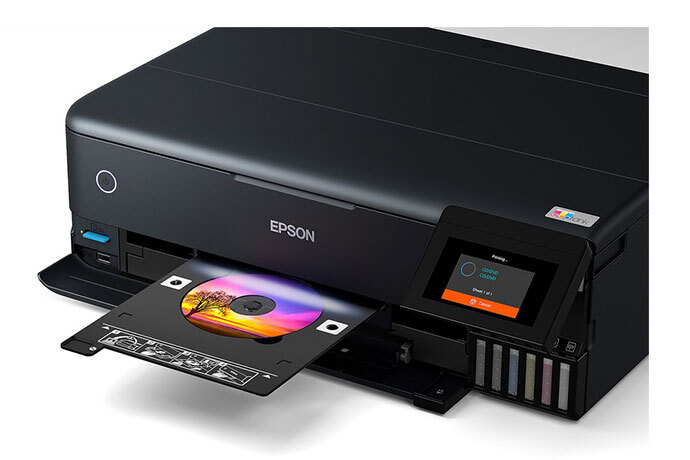
CD and DVD Surface Printing
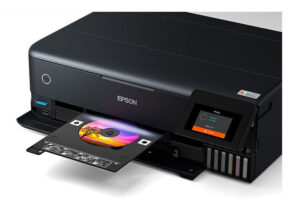
The Epson EcoTank L8180 supports direct printing onto compatible inkjet-printable CDs and DVDs.
Users can create personalised disc surfaces featuring photographs, titles, logos and decorative graphics.
This is useful for photography studios producing wedding media, event photography packages or personalised presentation discs.
The printer requires appropriate inkjet-printable media and the supported disc-printing tray.
Ordinary discs without an inkjet-printable coating should not be used.
The printing function applies to the surface of the disc; it does not write digital data to the disc itself.
Fine Art and Creative Printing
The Epson EcoTank L8180 is suitable for creative professionals who work with photographic and artistic media.
Its six-colour Claria ET Premium ink system helps produce detailed images with smooth gradients.
Borderless A3+ printing makes it suitable for large photographic compositions and creative presentations.
The rear and straight paper feeds support a selection of specialty media for artistic projects.
Designers can use the printer for portfolio pieces, concept artwork, photographic illustrations and creative displays.
For colour-critical work, customers should use suitable paper profiles and calibrated image-editing workflows.
High-Yield Refillable EcoTank Ink System
The Epson EcoTank L8180 features six integrated refillable ink tanks.
Instead of replacing conventional photo ink cartridges, users replenish the individual tanks using compatible genuine Epson ink bottles.
Epson India’s current product page advertises a yield of up to 2,300 photographs using replacement ink under its stated testing methodology.
The photo-yield estimate is based on 10 × 15 cm photographic output, not A3+ prints.
Actual output depends on image content, print settings, paper type, maintenance and operating conditions.
For photo studios, evaluating ink consumption with the actual photographic sizes printed is important when estimating running costs.
The refillable system provides convenient consumable management for users printing photographs regularly.
Genuine Epson Claria ET Premium Replacement Inks
The Epson EcoTank L8180 uses six genuine Claria ET Premium replacement ink colours.
The ink configuration includes Pigment Black, Photo Black, Cyan, Magenta, Yellow and Grey.
Epson India lists separate bottle codes for the pigment black and photo black inks.
This distinction is important because the two black inks have different intended printing functions.
The Grey ink bottle also has its own manufacturer part number.
Customers should order the exact compatible bottle rather than substituting inks from the L18050 or L8050 six-colour series.
Using the correct genuine Epson ink helps maintain expected print quality and printer operation.
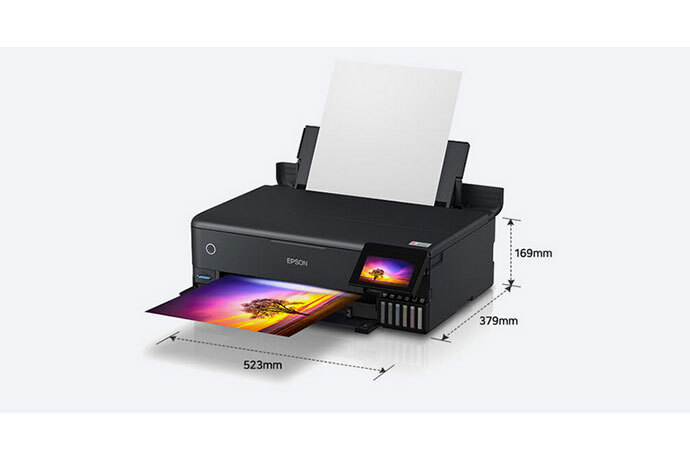
Compact A3+ Multifunction Design
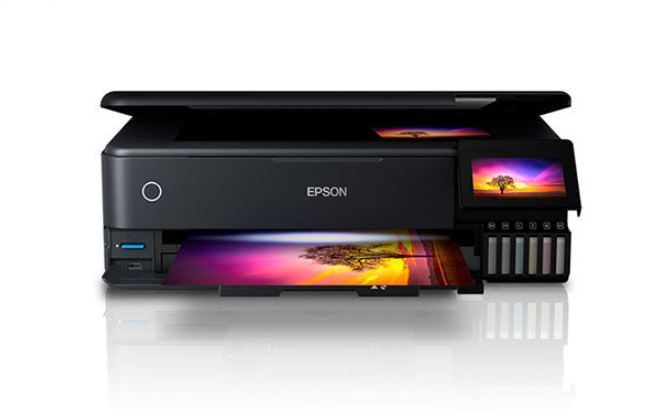
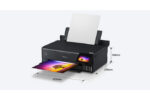
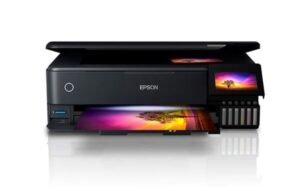
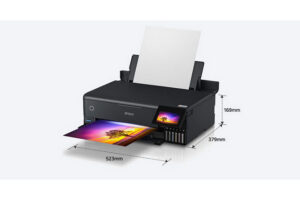
The Epson EcoTank L8180 features a professional black exterior with an integrated six-colour ink tank and colour touchscreen.
Its approximate dimensions are 523 × 379 × 169 mm.
The printer weighs approximately 11.1 kg.
Despite its A3+ printing capability, the machine combines printing, scanning and copying into one compact unit.
Its relatively low-profile design makes it suitable for photography studios, creative workspaces and dedicated printing stations.
Users should allow additional clearance for rear paper feeding, the straight paper path, scanning and paper output.
Replaceable Maintenance Box
The Epson EcoTank L8180 uses a replaceable maintenance box.
Epson India identifies maintenance box code C12C934601.
The maintenance box collects waste ink created during selected printer cleaning and maintenance operations.
When replacement is necessary, the printer provides appropriate maintenance notifications.
Users should follow Epson’s recommended replacement procedures.
The maintenance box is separate from the six ink bottles and should be considered when planning ongoing printer consumables.
Energy-Efficient Epson Heat-Free Printing
The Epson EcoTank L8180 uses Epson Micro Piezo Heat-Free Technology.
The printhead ejects ink using mechanical pressure instead of applying heat during the ink-ejection process.
Epson’s India technical brochure specifies approximately 17 W operating power consumption.
The printer also provides sleep and standby modes to help manage energy usage between printing tasks.
Actual power consumption depends on printer settings and usage.
For creative studios and households, the printer combines a relatively low operating-power rating with large-format photographic capability.
Epson EcoTank L8180 vs L18050
The Epson EcoTank L8180 and L18050 both support A3+ borderless photo printing, but they use different ink systems and provide different functions.
The Epson L18050 is a print-only photo printer using six dye inks: Black, Cyan, Magenta, Yellow, Light Cyan and Light Magenta.
The Epson L8180 is a multifunction printer using Pigment Black, Photo Black, Cyan, Magenta, Yellow and Grey.
The L8180 adds colour scanning, standalone copying, an automatic A4 duplex unit, a 4.3-inch touchscreen, Ethernet, SD card printing and more flexible specialty media handling.
Customers who primarily need a dedicated A3+ photo printer may choose the L18050.
Customers who want a premium multifunction photo printer with diverse media and connectivity options should consider the L8180.
Epson EcoTank L8180 vs L8100
The Epson EcoTank L8180 and L8100 are both six-colour multifunction photo printers.
The L8100 is an A4 photo printer that uses Black, Cyan, Magenta, Yellow, Light Cyan and Light Magenta dye inks.
The L8180 provides borderless printing up to A3+ and uses a different six-colour ink configuration with Pigment Black, Photo Black and Grey.
The L8180 also offers automatic A4 duplex printing and additional specialty paper-handling features.
It includes a larger 4.3-inch touchscreen and Ethernet connectivity.
Customers requiring A4 photo printing, scanning and copying may find the L8100 suitable.
Customers requiring large A3+ prints and more flexible artistic media support should consider the L8180.
Epson EcoTank L8180 Warranty
Epson India’s current product information advertises a manufacturer’s warranty of one year.
Its detailed India technical brochure and Epson-authorised partner listings identify a print limit of 50,000 pages, whichever comes first.
Warranty terms should be confirmed for the supplied unit and serial number, particularly because some older promotional materials state a different print limit.
Customers should retain their purchase invoice and follow Epson India’s warranty registration requirements.
Using genuine compatible inks and performing recommended maintenance helps support dependable printer operation.
Ideal for Photography Studios and Creative Professionals
The Epson EcoTank L8180 is suitable for photographers, designers, artists and users requiring detailed A3+ prints.
Photography studios can print portraits, wedding photographs, landscape images and portfolio photographs.
Artists and designers can use it for selected fine art papers, creative artwork, graphic presentations and design samples.
Home users can print family photographs, scan existing photographs and copy important documents.
Creative businesses can produce personalised photographs, artwork samples and suitable printable disc surfaces.
Its combination of six-colour ink, borderless A3+ printing, scanning, copying, multiple paper feeds and wireless networking makes it a versatile photographic printing system.
Why Choose Epson EcoTank L8180?
The Epson EcoTank L8180 combines premium six-colour photographic printing, high-resolution output, versatile paper handling and convenient multifunction capabilities.
Its dedicated Grey and Photo Black inks support smooth photographic tones, while the pigment black ink produces clear text on plain paper.
The printer supports A3+ borderless printing, automatic A4 duplex printing and Legal-size flatbed scanning.
The large touchscreen, Wi-Fi, Wi-Fi Direct, Ethernet and direct memory-device printing help simplify everyday operation.
For photographers and creative businesses seeking a premium all-in-one A3+ photo printer, the Epson EcoTank L8180 provides an excellent combination of quality and flexibility.
For official specifications, visit the Epson EcoTank L8180 manufacturer product page.
For genuine consumables, consult the manufacturer’s product specifications and ink compatibility information.
Technical Specifications
| Specification | Details |
|---|---|
| Brand | Epson |
| Series | EcoTank |
| Model | L8180 |
| Manufacturer Part Number | C11CJ21502 |
| Suggested Seller SKU | EPSON-L8180-A3PLUS-PHOTO-AIO |
| Product Type | A3+ Six-Colour Multifunction Photo Ink Tank Printer |
| Functions | Print, Scan, Copy |
| Print Output | Colour and Black & White |
| Printer Colour | Black |
| Printing Technology | Epson Micro Piezo Heat-Free Inkjet |
| Ink Technology | Claria ET Premium |
| Number of Ink Colours | 6 |
| Pigment Ink | Pigment Black |
| Dye Ink Colours | Photo Black, Cyan, Magenta, Yellow, Grey |
| Black Printhead Nozzles | 360 |
| Colour Printhead Nozzles | 720 Total |
| Printing Direction | Bidirectional |
| Maximum Print Resolution | 5760 × 1440 dpi |
| Minimum Ink Droplet | 1.5 pl, Epson India brochure |
| A4 Draft Speed – Black | Up to 32 ppm |
| A4 Draft Speed – Colour | Up to 32 ppm |
| ISO A4 Simplex Speed – Black | Up to 16 ipm |
| ISO A4 Simplex Speed – Colour | Up to 12 ipm |
| ISO A4 Duplex Speed – Black | Up to 6 ipm |
| ISO A4 Duplex Speed – Colour | Up to 5 ipm |
| ISO A3 Simplex Speed – Black | Up to 3.8 ipm |
| ISO A3 Simplex Speed – Colour | Up to 3 ipm |
| Printer Language | ESC/P-R, ESC/P Raster |
| Maximum Print Size | A3+ |
| Borderless Printing | Yes, up to A3+ |
| Automatic Duplex Printing | Yes, up to A4 |
| Automatic A3 Duplex Printing | No |
| CD/DVD Surface Printing | Yes, on compatible discs |
| Specialty Media Printing | Yes |
| Maximum Supported Thick Media | Up to 1.3 mm via straight feed |
| Maximum Supported Long Media | Up to 2 metres under supported settings |
| Scanner Type | CIS Colour Flatbed |
| Optical / Hardware Scan Resolution | 1200 × 4800 dpi |
| Maximum Scan Area | 216 × 355.6 mm (Legal) |
| Colour Scan Depth | 48-bit Input / 24-bit Output |
| Grayscale Scan Depth | 16-bit Input / 8-bit Output |
| Monochrome Scan Depth | 16-bit Input / 1-bit Output |
| Flatbed Black Scan Speed | Approx. 6 seconds at 200 dpi |
| Flatbed Colour Scan Speed | Approx. 11 seconds at 200 dpi |
| A3 Scanning | No |
| Automatic Document Feeder | No |
| Duplex Scanning | No |
| Copy Function | Yes |
| Copy Output | Black & White and Colour |
| Draft Copy Speed | Up to 31 cpm, Black / Colour |
| Maximum Standalone Copies | 99 |
| Maximum Copy Print Resolution | 720 × 720 dpi |
| Copy Reduction / Enlargement | 25%–400% |
| Maximum Copy Size | Legal |
| Fax | No |
| Paper Feed Method | Friction Feed |
| Front Photo Cassette | 20 Sheets, 5 × 7-inch photo paper |
| Front A4 Cassette | 100 Sheets, 80 gsm plain paper |
| A3+ Rear Feeder | Up to 50 Sheets, depending on media |
| Straight Paper Feed | 1 Sheet |
| Plain Paper Output | Up to 50 Sheets |
| Premium Glossy Photo Output | Up to 20 Sheets |
| Supported Borderless Sizes | A3+, A4, Letter, 8 × 10, 5 × 7, 4 × 6, 3.5 × 5 inches, 16:9 Wide and selected others |
| Plain Paper Weight | 64–90 gsm |
| Premium Glossy Photo Paper Weight | 102–300 gsm |
| Standard Print Margins | 3 mm unless borderless settings apply |
| USB Connectivity | High-Speed USB |
| Ethernet | 10BASE-T / 100BASE-TX |
| Wi-Fi | Yes |
| Wi-Fi Direct | Yes |
| SD Card Slot | Yes |
| Direct USB Flash Drive Printing | Yes |
| Supported Direct-Printing File Format | JPEG |
| Mobile Printing | Epson Smart Panel, Apple AirPrint |
| Epson Connect | Email Print, Remote Print Driver, Scan to Cloud |
| LCD Display | 10.9 cm (4.3-inch) Colour Touchscreen |
| Refillable Ink Tanks | Six |
| Pigment Black Ink Code | C13T07K198 |
| Photo Black Ink Code | C13T07J198 |
| Cyan Ink Code | C13T07K298 |
| Magenta Ink Code | C13T07K398 |
| Yellow Ink Code | C13T07K498 |
| Grey Ink Code | C13T07K598 |
| Advertised Photo Yield | Up to 2,300 4R Photos |
| Maintenance Box | C12C934601 |
| Operating Power Consumption | Approx. 17 W |
| Standby Power | Approx. 7.6 W |
| Sleep Power | Approx. 0.9 W |
| Power Off Consumption | Approx. 0.2 W |
| Rated Voltage | AC 220–240 V |
| Rated Frequency | 50–60 Hz |
| Dimensions (W × D × H) | 523 × 379 × 169 mm |
| Weight | Approximately 11.1 kg |
| India Warranty | 1 Year or 50,000 Prints, whichever comes first; verify supplied-unit entitlement |


Reviews
Clear filtersThere are no reviews yet.