



Epson EcoTank M1120 – Best Monochrome Wi-Fi Ink Tank Printer for Office Printing
The Epson EcoTank M1120 is a compact, efficient and economical monochrome single-function ink tank printer designed for homes, small businesses, educational institutions and professional offices. Featuring Epson Micro Piezo Heat-Free Technology, built-in Wi-Fi, Wi-Fi Direct and a high-capacity refillable pigment ink tank, this printer delivers reliable black-and-white document printing with affordable running costs.
The Epson EcoTank M1120 is designed specifically for monochrome printing. It produces professional black-and-white documents without requiring colour ink bottles, toner cartridges or additional scanning and copying hardware.
Whether you need to print invoices, quotations, business reports, purchase orders, financial statements, school assignments or office correspondence, the Epson EcoTank M1120 provides dependable performance in a compact desktop design.
Its wireless connectivity, high-yield ink system and 150-sheet paper input capacity make it an excellent choice for customers seeking convenient and economical everyday printing.
High-Quality Black-and-White Printing with Epson EcoTank M1120
The Epson EcoTank M1120 uses Epson Micro Piezo inkjet printing technology to produce sharp black text and detailed monochrome graphics.
With a maximum printing resolution of 1440 × 720 dpi, it delivers clear documents suitable for everyday home and office applications.
The printer uses genuine pigment-based black ink, which helps produce sharp, readable text and prints with useful water-resistant and smudge-resistant characteristics on compatible paper.
This is particularly beneficial when printing invoices, business correspondence, financial statements, contracts and documents that may be handled frequently.
Epson Variable-Sized Droplet Technology helps support accurate ink placement across compatible media.
The Epson EcoTank M1120 therefore provides consistent document printing for users who primarily require black-and-white output.
Fast Monochrome Printing for Office Productivity
The Epson EcoTank M1120 offers efficient printing speeds for routine home and office requirements.
It delivers maximum draft printing speeds of up to 32 pages per minute for A4 black-and-white documents.
Under ISO 24734 testing conditions, it achieves printing speeds of up to 15 images per minute.
The printer also provides a first-page output time of approximately 8 seconds, allowing users to begin printing quickly.
These printing speeds make the Epson EcoTank M1120 suitable for invoices, quotations, reports, educational documents and business correspondence.
Its printhead uses a configuration of 180 × 2 black nozzles designed to support consistent monochrome output.
Actual printing speeds depend on document complexity, print quality settings, paper type, software, connectivity and system performance.
Economical Printing with High-Yield Black Ink
One of the major advantages of the Epson EcoTank M1120 is its refillable ink tank system.
Instead of using conventional disposable toner cartridges, the printer features an integrated black ink reservoir that can be refilled using compatible genuine Epson ink bottles.
Epson’s model-specific brochure identifies the Epson 005 high-capacity black ink bottle with an estimated replacement yield of up to 6,000 pages.
A standard-capacity Epson 005S bottle is also listed, with an estimated yield of up to 2,000 pages.
Epson India’s current ink finder additionally identifies Epson T03Q and T01P black ink bottles as compatible with the M1120.
The high-yield ink system helps reduce the frequency of consumable replacement and supports economical printing for businesses regularly producing black-and-white documents.
Actual page yields depend on printed content, printing conditions, document coverage, maintenance requirements and the specific replacement ink bottle.
Low-Cost Printing for Small Businesses
The Epson EcoTank M1120 is designed to reduce everyday monochrome printing costs.
Epson India advertises a cost per print starting from approximately 15 paise per black page, based on the manufacturer’s specified high-capacity ink and calculation conditions.
This is particularly attractive for offices printing a large number of invoices, delivery challans, quotations, reports and administrative documents.
The integrated refillable ink tank removes the need for traditional toner cartridges.
Businesses can replace the black ink bottle as required while continuing to use the printer’s integrated ink system.
For organisations that do not require colour printing, this configuration helps simplify consumable management.
Actual printing costs depend on the price of replacement ink, paper, page coverage, maintenance and operating conditions.
Epson Micro Piezo Heat-Free Technology
The Epson EcoTank M1120 features Epson Heat-Free Technology.
Unlike conventional thermal inkjet systems, Epson’s Micro Piezo technology does not require heat during the ink ejection process.
Instead, the printhead uses mechanical pressure to eject ink droplets onto the paper.
This technology supports efficient energy consumption while maintaining reliable monochrome printing performance.
The Epson EcoTank M1120 uses Variable-Sized Droplet Technology, with a minimum ink droplet volume of approximately 3 picolitres.
These technologies help provide precise ink placement and clear black text.
For households and offices seeking an economical printing solution, the combination of efficient printing technology and high-yield ink is particularly practical.
Convenient Built-In Wi-Fi Connectivity
A distinguishing feature of the Epson EcoTank M1120 is its built-in Wi-Fi connectivity.
Unlike the USB-only Epson EcoTank M1100, the M1120 allows compatible devices to send printing jobs through a wireless network.
Users can connect the printer to a compatible Wi-Fi router and print from supported laptops, desktop computers, smartphones and tablets.
This wireless functionality makes the printer convenient for workspaces where devices are positioned in different rooms or locations.
It also reduces the need to keep the printer physically connected to a particular computer.
For small businesses and home offices, wireless printing helps provide a flexible document-printing workflow.
Wi-Fi Direct for Router-Free Printing
The Epson EcoTank M1120 also supports Wi-Fi Direct, allowing compatible devices to establish a direct wireless connection with the printer.
This feature can be useful when a traditional wireless router is unavailable or when users want to print directly from a compatible device.
According to Epson India, Wi-Fi Direct allows up to eight compatible devices to connect to the printer.
This makes the M1120 convenient for shared environments where multiple users may need access to the same printer.
Wi-Fi Direct setup and available functions depend on the connected device and supported printing software.
The printer also retains its USB 2.0 connection option for compatible computers.
Mobile Printing with Epson iPrint
The Epson EcoTank M1120 supports the Epson iPrint application for compatible smartphones and tablets.
Epson iPrint provides a convenient way to send supported documents and images to a compatible Epson printer over a suitable connection.
This allows users to print without transferring every document to a desktop computer first.
Mobile printing is particularly useful for professionals who receive quotations, reports, business documents or other printable files on their smartphones.
The availability of individual mobile functions depends on the application, operating system and network configuration.
Since the M1120 is a single-function printer, mobile software does not add physical scanning or copying capabilities.
Epson Connect and Remote Printing
The Epson EcoTank M1120 supports Epson Connect services for flexible remote printing.
Epson Email Print allows users to send supported documents to a properly configured printer using email.
The Epson Remote Print Driver enables compatible computers to submit print jobs to registered Epson printers over an internet connection.
These services can be helpful when users need to prepare documents from different locations.
Remote printing requires compatible devices, suitable internet access and the correct Epson service configuration.
The printer also supports ordinary local wireless printing when connected to a suitable Wi-Fi network.
USB 2.0 Connectivity for Direct Printing
In addition to Wi-Fi and Wi-Fi Direct, the Epson EcoTank M1120 features a USB 2.0 interface.
This allows the printer to connect directly to a compatible desktop computer or laptop using a suitable USB printer cable.
USB connectivity is convenient for users who prefer a dedicated wired connection.
It can also be useful during printer configuration or in environments where wireless connectivity is restricted.
The Epson EcoTank M1120 does not include a built-in Ethernet port.
Customers who specifically require wired network connectivity should select an Epson model with an Ethernet interface.
Sharp and Durable Pigment Ink Printing
The Epson EcoTank M1120 uses genuine Epson pigment-based black ink.
This technology helps produce clear text and detailed monochrome graphics on compatible paper.
The pigment formulation provides useful water-resistant and smudge-resistant properties, making it suitable for documents that may be handled regularly.
Invoices, quotations, administrative forms, reports and business correspondence can benefit from sharp text and professional-looking output.
Since the printer uses only black ink, users do not need to maintain separate cyan, magenta and yellow ink reservoirs.
This simplifies consumable purchasing and replacement for customers who print exclusively in black and white.
150-Sheet Paper Input Capacity
The Epson EcoTank M1120 features a paper input tray capable of accommodating up to 150 sheets of A4 or Letter plain paper under the manufacturer’s specified conditions.
This capacity helps reduce frequent paper loading during routine office printing.
The output tray accommodates up to 30 sheets of plain paper.
The printer also supports selected envelopes and other compatible media.
Its paper-handling system is practical for invoices, statements, business letters, official forms and educational documents.
For small businesses with regular monochrome printing requirements, the 150-sheet paper capacity provides convenient everyday operation.
Flexible A4 and Legal Paper Support
The Epson EcoTank M1120 supports common paper formats including A4, A5, A6, B5, B6, Letter, Legal and Indian Legal.
It also supports selected envelope formats, including #10, DL and C6.
For specialised documents, the printer supports compatible custom paper sizes up to approximately 215.9 × 1200 mm.
These paper-handling capabilities make the printer suitable for a variety of monochrome business documents.
Users should select the correct paper size and media settings through the printer driver to maintain reliable performance.
The printer is designed for A4-class printing and is not an A3 printer.
Compact and Space-Saving Design
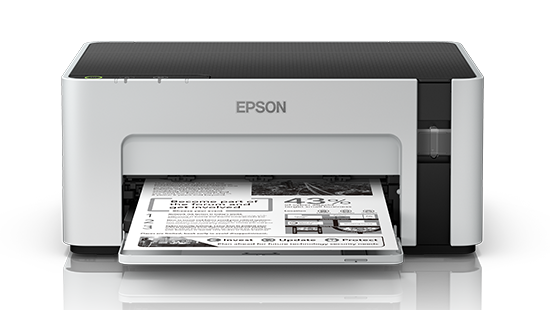
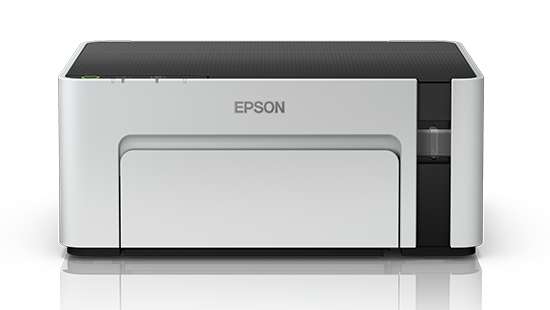
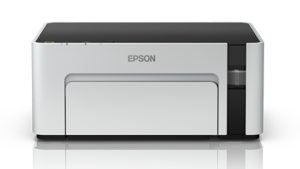
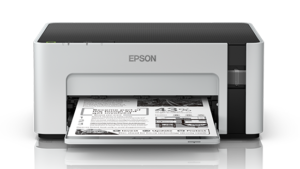
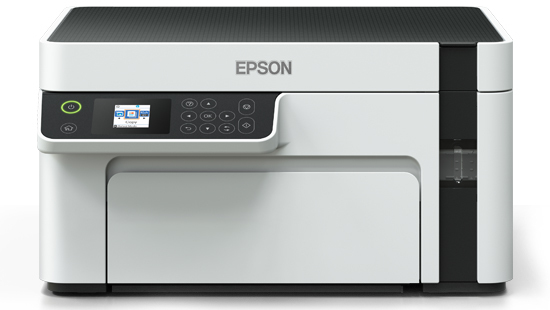
The Epson EcoTank M1120 features a professional white-and-grey exterior with a black top panel.
Its integrated ink tank system provides a compact footprint without requiring a separate external ink reservoir.
The printer measures approximately 375 × 267 × 161 mm, making it suitable for office desks, study tables, reception counters and compact workstations.
Weighing approximately 3.5 kg, it is relatively lightweight and easy to position on a suitable desk.
Its front-facing ink tank area allows users to check remaining ink levels conveniently.
The printer uses physical control buttons and status indicators rather than an LCD screen.
Spill-Free and Convenient Ink Refilling
The Epson EcoTank M1120 features an integrated black ink tank designed for convenient refilling.
Epson’s specially designed ink bottle nozzle helps simplify the refilling process and reduces the likelihood of accidental spills.
The integrated ink system makes it practical for users to replenish ink without replacing conventional cartridges.
Customers should use genuine manufacturer-compatible black ink bottles and follow Epson’s recommended refilling procedures.
Using the correct ink helps maintain consistent output quality and dependable operation.
The printer’s high-yield black ink system is particularly useful for users who print documents frequently.
No Automatic Duplex Printing
The Epson EcoTank M1120 does not feature a built-in automatic duplex printing mechanism.
This means the printer cannot automatically turn sheets to print both sides of a document.
Users requiring occasional two-sided printing may manually turn paper using suitable printing settings.
For businesses that frequently need automatic double-sided printing, an Epson model with a dedicated duplex unit would be more suitable.
This distinction is especially important for business procurement, quotations and tender specifications.
Dedicated Single-Function Printing
The Epson EcoTank M1120 is a single-function printer designed exclusively for monochrome printing.
It does not include a scanner, copier, fax machine or automatic document feeder.
This focused design is useful for customers who need only black-and-white document output.
The absence of multifunction hardware also helps maintain a compact desktop footprint.
For users who already have a separate scanner or do not need photocopying, the M1120 offers a practical dedicated printing solution.
Energy-Efficient Printing Performance
The Epson EcoTank M1120 is designed for efficient power consumption.
Epson’s India brochure lists approximately 14 W operating power consumption, with around 3 W in standby and 0.7 W in sleep mode.
The printer’s Heat-Free Technology does not require the thermal ink ejection process used in certain other inkjet systems.
Its energy-efficient design makes it suitable for households, small businesses and professional offices looking to manage operating costs.
Actual power consumption varies according to usage, settings and operating conditions.
Epson EcoTank M1120 Warranty
The Epson EcoTank M1120 comes with a manufacturer’s warranty of three years or 100,000 prints, whichever occurs first, subject to Epson India’s applicable warranty terms.
The warranty includes printhead coverage under the manufacturer’s stated conditions.
This provides additional reassurance for customers who regularly print monochrome documents.
Users should retain their purchase invoice and follow Epson’s warranty and service requirements.
Warranty coverage, exclusions and service availability should be verified for the supplied unit.
Ideal for Small Businesses and Professional Offices
The Epson EcoTank M1120 is suitable for a variety of everyday black-and-white printing applications.
Small businesses can use it for invoices, quotations, purchase orders, delivery challans and customer correspondence.
Accounting departments can print financial statements, reports, invoices and administrative records.
Educational institutions can produce examination notes, worksheets, assignments and monochrome learning materials.
Home offices can print application forms, personal documents, study materials and everyday paperwork.
Professional service providers can prepare business letters, contracts, records and other monochrome documents.
Its combination of wireless printing, a high-yield ink system and a compact design makes it useful for offices with regular document-printing needs.
Difference Between Epson EcoTank M1100 and M1120
The Epson EcoTank M1100 and M1120 are closely related monochrome single-function ink tank printers.
Both provide A4 black-and-white printing, up to 15 ipm ISO speed, a 150-sheet input tray and a high-yield refillable ink system.
The most important difference is connectivity.
The Epson M1100 supports USB-only printing, while the Epson M1120 additionally supports Wi-Fi and Wi-Fi Direct.
This makes the M1120 more suitable for customers who want wireless printing from compatible computers and mobile devices.
Neither model includes scanning, copying, faxing, Ethernet or automatic duplex printing.
Why Choose Epson EcoTank M1120?
The Epson EcoTank M1120 combines economical printing, wireless convenience and dependable monochrome output.
Its main benefits include a high-yield black ink tank, sharp pigment-based text, Epson Heat-Free Technology, Wi-Fi Direct and a compact desktop design.
With printing speeds of up to 15 ipm under ISO testing and a first-page output time of approximately eight seconds, it provides efficient printing for everyday office requirements.
For customers seeking a dedicated black-and-white printer with wireless connectivity, the Epson EcoTank M1120 is a practical choice.
For detailed manufacturer specifications, visit the official Epson EcoTank M1120 product page.
For genuine replacement consumables, check Epson M1120 compatible ink bottles.
Technical Specifications
| Specification | Details |
|---|---|
| Brand | Epson |
| Model | EcoTank M1120 |
| Manufacturer Part Number | C11CG96504 |
| Printer Colour | White / Grey with Black Top |
| Product Type | A4 Monochrome Single-Function Ink Tank Printer |
| Functions | Print Only |
| Print Output | Black & White |
| Printing Technology | Epson Micro Piezo Heat-Free Inkjet |
| Printhead Nozzles | 180 × 2 Black Nozzles |
| Printing Direction | Bi-Directional |
| Ink Technology | Pigment Black Ink |
| Number of Ink Colours | 1 – Black |
| Maximum Print Resolution | 1440 × 720 dpi |
| Minimum Ink Droplet | 3 pl |
| Draft Print Speed (A4) | Up to 32 ppm Black |
| ISO Print Speed (A4) | Up to 15 ipm Black |
| First Page Output | Approx. 8 Seconds |
| Printer Language | ESC/P-R |
| Maximum Standard Print Size | A4 |
| Maximum Custom Paper Size | 215.9 × 1200 mm |
| Automatic Duplex Printing | No |
| Colour Printing | No |
| Scanner | No |
| Copying | No |
| Fax | No |
| Automatic Document Feeder | No |
| Paper Feed Method | Friction Feed |
| Number of Paper Trays | 1 |
| Paper Input Capacity | 150 Sheets A4/Letter Plain Paper |
| Paper Output Capacity | 30 Sheets |
| Envelope Input Capacity | Up to 10 Envelopes |
| Supported Paper Sizes | A4, A5, A6, B5, B6, Letter, Legal, Indian Legal, 16K |
| Additional Media | Hagaki and Selected Custom Sizes |
| Supported Envelopes | #10, DL, C6 |
| Supported Paper Weight | 64–90 gsm |
| Minimum Print Margins | 3 mm on each side with specified settings |
| USB Connectivity | USB 2.0 |
| Wi-Fi | Yes, IEEE 802.11b/g/n |
| Wi-Fi Direct | Yes |
| Wi-Fi Direct Connections | Up to 8 Compatible Devices |
| Ethernet | No |
| Network Protocols | TCP/IPv4, TCP/IPv6 |
| Mobile Printing | Epson iPrint |
| Epson Connect | Epson Email Print, Remote Print Driver |
| LCD Display | No |
| Control Panel | Physical Buttons and Indicators |
| Black Ink | Epson 005 / 005S; T03Q and T01P also listed as compatible |
| Standard Replacement Ink Yield | Up to 2,000 Pages – Epson 005S |
| High-Capacity Replacement Ink Yield | Up to 6,000 Pages – Epson 005 |
| Maintenance Box | No M1120-specific user-replaceable SKU confirmed |
| Operating Power Consumption | Approx. 14 W |
| Standby Power | Approx. 3 W |
| Sleep Power | Approx. 0.7 W |
| Power Supply | AC 220–240 V, 50/60 Hz |
| Dimensions (W × D × H) | 375 × 267 × 161 mm |
| Weight | Approx. 3.5 kg |
| Warranty | 3 Years / 100,000 Prints |

Reviews
Clear filtersThere are no reviews yet.