





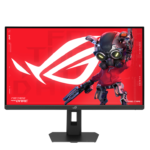



ASUS ROG Strix 5K XG27JCG Gaming Monitor
The ASUS ROG Strix 5K XG27JCG combines a detailed 5K image with high-refresh gaming modes in a 27-inch desktop display. Its native 5120 × 2880 resolution and Fast IPS panel suit a setup used for gaming, creative applications and everyday productivity. Dual Mode gives you a choice between higher resolution and a faster refresh rate, helping the same screen serve different games and tasks throughout the day.
Detailed 5K Visuals at 218 PPI
A pixel density of approximately 218 pixels per inch gives this 27-inch screen a fine pixel structure. This can help when viewing small text, detailed photographs and complex game environments. For desktop work, adjust operating-system scaling to achieve a comfortable balance between readable text and usable workspace. The anti-glare surface and wide IPS viewing angles also make the display practical for a desk used across several activities.
XG27JCG Dual Mode: 5K 180Hz OC or QHD 330Hz
Frame Rate Boost allows you to switch between 5K at up to 180Hz through overclocking and QHD at 330Hz. The QHD mode uses 2560 × 1440 resolution. Choose the 5K mode for image detail, then move to QHD when a higher refresh rate suits your competitive game. Actual game frame rates depend on your computer, game settings and rendering workload, so select the mode that works best with your system.
Check Graphics Compatibility for Maximum 5K Refresh
The maximum 5K refresh rate varies with the graphics card, connection and software environment. ASUS’s support table lists tested GeForce RTX 5070 and RTX 5080 configurations at 5K 180Hz, while tested RTX 4070 and RTX 3070 configurations reach 5K 120Hz. Mac results also vary by model and operating system. Review the official XG27JCG GPU compatibility list before planning a setup around the monitor’s maximum 5K refresh rate.
Fast IPS Response and Motion-Clarity Tools
ASUS specifies a minimum 0.3ms grey-to-grey response time. ELMB 2 provides additional motion-clarity settings, while ELMB Sync supports blur reduction alongside variable refresh rate under supported conditions. NVIDIA G-SYNC Compatible support and AMD FreeSync Premium Pro help coordinate refresh with compatible graphics hardware. These features give you several ways to tailor the display for fast-moving content. Adjust the available settings around the game you play and the frame rates your system delivers.
DisplayHDR 600 and Wide-Gamut Colour
VESA DisplayHDR 600 certification, 97% DCI-P3 coverage and support for 10-bit colour add versatility for entertainment and creative content. ASUS also lists factory colour accuracy of Delta E below 2. The combination supports viewing richly coloured game environments, photographs and video. Choose the appropriate picture mode for your content and adjust brightness to suit your workspace, particularly when moving between desktop applications and HDR entertainment.
USB-C, DisplayPort and HDMI Connections
The XG27JCG includes one DisplayPort 1.4 input with DSC, two HDMI 2.1 inputs and USB-C with DisplayPort Alt Mode. USB-C Power Delivery is rated at 15W. A three-port USB 3.2 Gen 1 Type-A hub provides peripheral connectivity. Check your computer’s supported display output and power requirements when selecting a connection. A headphone output is available for an external audio setup, while the monitor has no built-in speakers.
Personalise Settings with DisplayWidget Center
ASUS DisplayWidget Center lets you adjust supported monitor settings through a software interface and tailor display profiles to different games. It supports convenient control for compatible Windows and macOS setups. This makes routine changes easier when the screen serves both work and entertainment. Available controls depend on the model, software version and connected system, so configure the supported options around your own daily activities.
Adjustable Stand and Your Complete Setup
Height, tilt, swivel and pivot adjustments help position the screen around your seating arrangement. VESA 100 × 100mm mounting supports compatible arms or brackets. Start by setting the screen height and distance for your usual seating position, then fine-tune the angle before beginning a longer gaming or work session. Explore suitable desktop computers at Aadinath Peripherals & Consumables, review the official XG27JCG specifications, or contact our team for help matching the display to your computer and workspace.
Technical specifications
| Specification | Details |
|---|---|
| Model | ASUS ROG Strix 5K XG27JCG |
| Screen size | 27 inches |
| Panel / surface | Fast IPS / Anti-glare |
| Native resolution | 5120 × 2880, 5K |
| Aspect ratio / pixel density | 16:9 / Approximately 218 PPI |
| Dual Mode | Up to 5K 180Hz (OC) / QHD 330Hz |
| QHD mode resolution | 2560 × 1440 |
| Response time | 0.3ms GTG minimum |
| HDR certification | VESA DisplayHDR 600 |
| Typical / peak HDR brightness | 350 cd/m² typical / 600 cd/m² peak HDR |
| Colour | 97% DCI-P3; 10-bit; Delta E < 2 |
| Typical contrast ratio | 1500:1 |
| Viewing angles | 178° horizontal / 178° vertical |
| Adaptive refresh | G-SYNC Compatible; FreeSync Premium Pro |
| Motion-blur features | ELMB 2; ELMB Sync |
| Video inputs | 1 × DisplayPort 1.4 DSC; 2 × HDMI 2.1; 1 × USB-C DP Alt Mode |
| USB-C Power Delivery | 15W |
| USB hub | 3 × USB 3.2 Gen 1 Type-A |
| Audio | Headphone output; no built-in speakers |
| Height adjustment | 0–110mm |
| Tilt / swivel / pivot | -5° to +20° / ±40° / ±90° |
| VESA mounting | 100 × 100mm |
| Additional features | GamePlus, GameVisual, AI Visual, Dynamic Crosshair, Dynamic Shadow Boost |
| Lighting / tripod socket | Aura Sync / ¼-inch tripod socket |
| Net weight with stand | Approximately 6.9kg |
| 5K refresh compatibility | Depends on graphics hardware, connection and system configuration |

Reviews
Clear filtersThere are no reviews yet.